
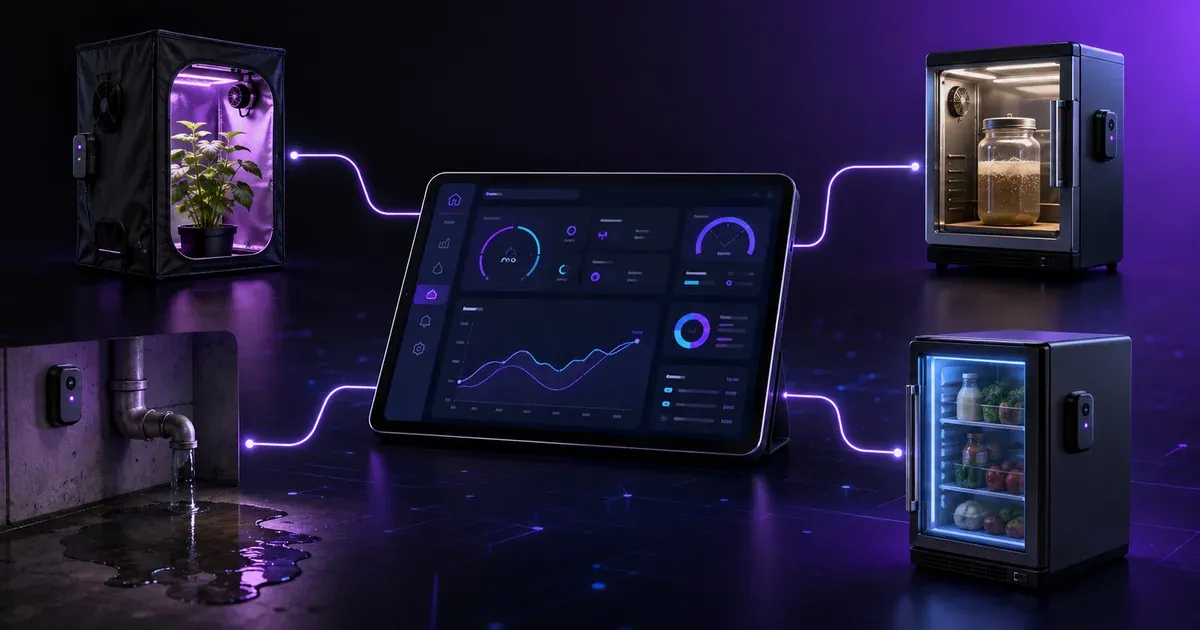
What Can You Build on LoopString’s Free Tier? 4 Real Automation Projects
By LoopString Team
When people see a free tier, they usually ask one question first: is this just a demo, or can I actually build something useful with it?
That is the right question to ask.
A free plan should do more than let you click around a dashboard for five minutes. It should give you enough room to connect a real setup, monitor real signals, automate real decisions, and prove to yourself that the platform fits the way you work. That is exactly where LoopString’s free tier becomes interesting.
With 1 device, 8 sensor slots, and 24 hours of history, you are not building a massive multi-room deployment. You are not replacing every control system in your operation on day one. But you absolutely can build complete, practical, outcome-driven projects that solve real problems, save time, reduce guesswork, and show you where a larger deployment would create even more value.
That matters because most people do not need “infinite” on day one. They need a starting point that is simple enough to launch this week and useful enough to justify growing later.
The smartest way to approach LoopString’s free tier is not to ask, “What are the limits?” The better question is, “What is the most valuable thing I can prove with these limits?”
In many cases, the answer is a lot.
You can validate environmental control logic. You can centralize readings that were previously scattered across standalone tools. You can replace manual checks with live visibility. You can create alerts around conditions that matter. You can test whether one monitored device becomes two, whether eight sensor slots should become sixteen, or whether one day of history should become a longer trendline for decision-making.
In other words, the free tier is not a dead end. It is a launchpad.
Below are four complete projects you can build on LoopString’s free tier right now. Each one fits inside the free-tier footprint. Each one solves a clear problem. And each one creates a natural point where upgrading makes sense, not because you are forced into it, but because the value becomes obvious.
Why the Free Tier Is More Powerful Than It Looks
Before getting into the projects, it helps to understand what these free-tier limits really mean in practice.
1 device means you can fully focus on one physical environment, one controller, or one self-contained system. That is often enough to prove the concept before rolling out the same model elsewhere.
8 sensor slots is more flexible than it sounds. Most first projects do not need dozens of data points. They need the right ones. A carefully chosen set of eight readings or states can give you a very clear picture of what is happening and whether your automation rules are working.
24-hour history is enough to spot daily patterns, validate schedules, compare day versus night performance, detect short-term instability, and confirm that your setup behaves the way you expect after changes. It is not a substitute for long-range analytics, but it is more than enough for setup, testing, tuning, and proof of value.
That combination makes the free tier ideal for a first real deployment.
Not a toy project. A real one.
Project 1: Build a Small Grow Tent Climate Controller
One of the best free-tier use cases is a compact grow tent or controlled environment chamber.
This project works because a small grow space usually has a limited number of critical variables, and those variables map very well to an 8-slot setup.
What this project solves
Small controlled environments are easy to start but surprisingly hard to stabilize. Temperature can drift. Humidity can swing faster than expected. CO2 or airflow conditions may change during different parts of the day. Lights and fans often run on simple timers, even when the actual environment says something different should happen.
That creates a familiar problem: the setup is technically “working,” but the operator is still babysitting it.
LoopString’s free tier lets you turn that setup into a monitored system instead of a guessing game.
A practical 8-slot layout
A complete small grow-tent project could look like this:
- Air temperature
- Relative humidity
- CO2 sensor
- Substrate or media temperature
- Water reservoir level
- Light status
- Fan status
- Humidifier or exhaust relay state
That is eight meaningful inputs or states without wasting a slot.
What you can do with it
With those points connected, you can create a single dashboard view for the tent, track how conditions behave over a 24-hour cycle, and identify whether your fan, humidifier, and light schedules are producing the conditions you actually want.
This is where the free tier becomes valuable. You do not just see numbers. You see relationships.
Did humidity crash right after lights came on? Did temperature spike when the exhaust fan remained off too long? Did the reservoir level drop faster than expected during the warmest period? Did nighttime conditions become more stable than daytime conditions?
Those are the kinds of insights that help you stop “managing by feel.”
Why this is a complete project
This is not just sensor viewing. It is a full first deployment:
- One device controls one environment
- Eight slots cover the most important variables
- A 24-hour window shows the full daily cycle
- The setup is easy to tune and easy to understand
The natural upgrade moment
You will likely want to upgrade when one of three things happens:
First, you want to monitor a second tent, room, or chamber.
Second, you want more sensor detail, such as adding differential readings, door state, surface temperature, VPD-related inputs, or extra relay states.
Third, you want more than 24 hours of history so you can compare multiple days, identify recurring patterns, and optimize over time rather than over one daily cycle.
That upgrade moment feels natural because the first setup already proved its worth.
Project 2: Create a Fermentation or Incubation Monitoring Station
If you are running a fermentation chamber, incubation setup, proofing cabinet, curing box, or any other small temperature-sensitive enclosure, the free tier is an excellent fit.
These environments often seem simple at first. In reality, they benefit enormously from visibility.
What this project solves
Processes that depend on stable conditions can drift quietly. The chamber may look fine when you check it, but between checks, temperature overshoots, humidity drops, or airflow changes can alter outcomes.
The challenge is not just control. It is confidence.
You want to know whether the chamber stayed where it needed to stay, not whether it happened to be correct when you glanced at it.
A practical 8-slot layout
For a fermentation or incubation project, your eight slots might be:
- Chamber air temperature
- Chamber humidity
- Product or internal probe temperature
- Heater status
- Cooling status
- Door open/closed state
- Fan circulation status
- Ambient room temperature
This creates a highly usable monitoring package around one enclosure.
What you can do with it
Once connected, you can observe the chamber as a system rather than a box with a thermostat.
You can see whether room temperature changes are affecting chamber stability. You can identify how often heating or cooling cycles activate. You can catch the impact of opening the door. You can test whether internal product temperature lags behind chamber temperature more than expected.
This is where a lot of people discover the real value of even a modest sensor deployment. What used to be “it seems to be working” becomes “I know what happened over the last 24 hours.”
That difference matters when consistency matters.
Why this is a complete project
This setup is self-contained, actionable, and immediately useful:
- One device manages one chamber
- Eight well-chosen slots provide a full operational picture
- Daily history validates temperature control behavior
- The dashboard becomes part of routine operation, not just troubleshooting
The natural upgrade moment
You will want more when you begin expanding from one chamber to multiple chambers, multiple recipes, or multiple product stages.
You may also want more history once your focus shifts from daily stability to process optimization across batches. A single day of history is enough to validate operation. A longer timeline is where deeper operational learning begins.
That is the moment when an upgrade stops feeling like a subscription decision and starts feeling like a workflow decision.
Project 3: Build a Utility Room Leak, Tank, and Equipment Watchdog
Not every great first project is about a grow space or controlled climate. Sometimes the highest-value free-tier deployment is a quiet, practical equipment watchdog.
Think utility closets, pump stations, storage rooms, small mechanical rooms, or water-handling areas.
What this project solves
Equipment problems often start small. A leak begins as a damp corner. A tank level drifts lower than expected. A pump cycles more frequently than usual. A room overheats because airflow changed. These are not always catastrophic right away, but they become expensive when nobody notices early.
A lightweight monitoring setup can give you early visibility before a small issue becomes a shutdown, cleanup, or repair.
A practical 8-slot layout
A strong utility monitoring build could include:
- Leak sensor near the floor
- Tank or reservoir level
- Pump running state
- Room temperature
- Room humidity
- Door or access state
- Power state or device uptime signal
- Secondary leak or overflow sensor
This uses the free tier very efficiently because each slot directly maps to a risk or operational state.
What you can do with it
With a simple dashboard, you can monitor equipment health and environmental risk in one place. You can see whether the pump is cycling too often in a 24-hour period. You can confirm whether humidity is climbing unexpectedly. You can detect whether a door was left open. You can catch a low-level or leak event before it becomes a much bigger issue.
Even in a basic deployment, that kind of visibility changes how problems are handled.
Instead of discovering issues after the fact, you create a system that is always watching the room.
Why this is a complete project
This is a full production-worthy starter use case because it has a clear purpose, a defined footprint, and immediate operational value.
You are not collecting sensor data for curiosity. You are using it to reduce risk.
That makes the free tier especially attractive for teams that want to test LoopString in a single location before standardizing it across more equipment rooms or sites.
The natural upgrade moment
The upgrade usually happens when one room turns into many rooms.
Once you prove the value of monitoring one utility area, it becomes obvious that the same logic applies to every place with water, pumps, heat, airflow, or unattended equipment. That is when the one-device limit becomes the right reason to expand.
The same applies when you want deeper retention to investigate intermittent issues. A 24-hour window is enough to catch many short-term anomalies. But once you start hunting weekly or monthly patterns, you will want more history.
Project 4: Launch a Cold Storage or Mini Fridge Compliance Tracker
A small cooler, cold room, mini fridge, sample storage unit, or ingredient holding cabinet can be a perfect first project.
This use case is powerful because the value is easy to understand. Temperature-sensitive storage needs proof, not assumptions.
What this project solves
In any chilled storage environment, a single missed drift can lead to waste, quality loss, or compliance headaches. Many operators still rely on spot checks, handwritten notes, or separate consumer devices that do not centralize data in a way that is operationally useful.
LoopString’s free tier gives you a simple way to start monitoring one cold-storage unit properly.
A practical 8-slot layout
A strong cold-storage free-tier setup could include:
- Internal air temperature
- Secondary internal temperature probe
- Door state
- Ambient room temperature
- Compressor or cooling cycle status
- Humidity
- Alarm state
- Backup threshold sensor or product probe
This gives you both environmental context and operational signals.
What you can do with it
You can track whether the unit stays stable over a full day, see how often the door opens, compare internal temperature to room temperature, and confirm whether the cooling cycle is keeping up during higher-use periods.
This turns a refrigerator, cold cabinet, or small storage unit into a monitored asset rather than an appliance you hope is behaving.
That is especially valuable in spaces where one small unit protects something important.
Why this is a complete project
This is a complete free-tier project because it covers one asset fully enough to be useful:
- One device maps to one storage unit
- Eight slots provide full context
- Daily history shows actual operating behavior
- The dashboard becomes a source of accountability and confidence
The natural upgrade moment
The next step usually comes quickly. Once one fridge, one cabinet, or one cooler is monitored well, the question becomes obvious: what about the others?
That is the exact kind of upgrade pressure you want. Not artificial friction. Just clear evidence that monitoring more assets in the same way would improve operations.
How to Choose the Best First Project
The smartest first LoopString project is usually not the biggest one. It is the one that gives you the fastest proof.
That means your best candidate has three traits:
1. It fits naturally inside 8 sensor slots
Do not force a sprawling system into a starter footprint. Choose something compact enough that eight readings or states tell the real story.
2. It has a daily cycle you can evaluate in 24 hours
The free tier is especially strong when one day of history is enough to reveal performance. Climate control, storage stability, equipment cycles, and room monitoring all fit this pattern.
3. It solves a pain point you already feel
The right first project is usually the one you are already checking manually, worrying about after hours, or troubleshooting too often. If you already feel the pain, the value of monitoring becomes obvious faster.
What Makes These Projects Good for Conversion
There is a reason these projects work well as free-tier examples.
They are concrete.
A lot of software messaging stays too abstract. It talks about visibility, optimization, insight, and control without showing what a user actually does first. But people sign up faster when they can picture a real project.
They want to know:
- What can I connect?
- What can I see?
- What problem does it solve?
- How soon will I know whether this is useful?
That is why “What can you build?” is such a powerful framing device. It lowers signup friction because it turns the platform from a concept into a next step.
It also creates healthy upgrade momentum.
A user who successfully deploys one grow tent, one chamber, one utility room, or one fridge no longer wonders whether LoopString is relevant. They know it is. At that point, upgrading is not about being sold. It is about expanding what is already working.
Free Tier First, Scale When the Value Is Clear
The best free tiers do not trap people in a watered-down experience. They let people prove something meaningful.
LoopString’s free tier does exactly that.
With one device, eight sensor slots, and a 24-hour history window, you can build a real first deployment. You can monitor a compact environment. You can watch the right variables. You can validate your setup over a full day. You can reduce manual checking. You can start making decisions from live data instead of assumptions.
Most importantly, you can find your first operational win without overcommitting.
That is what makes the free tier useful. It is not trying to be everything. It is giving you enough room to build something that matters.
And once you do, the next step becomes obvious.
Maybe you want a second device. Maybe you want more sensor coverage. Maybe you want deeper history. Maybe you want to standardize your setup across more rooms, chambers, tents, storage units, or equipment spaces.
That is the right time to upgrade: not when you are still guessing, but when the return is already visible.
If you are evaluating LoopString for the first time, start with the smallest real project that would make your day easier. Build that. Watch it for 24 hours. Learn from it. Tune it. Trust it.
Then grow from there.
Because the easiest way to see what you need next is to start with something useful now.
Frequently asked questions
Yes. The free tier includes 1 device, 8 sensor slots, and 24 hours of history at no cost — enough to build a complete first project like a grow tent, fermentation chamber, utility watchdog, or cold-storage tracker, not just a demo.